
From Canva's new AI design partner and Instagram's free Edits app to schedulers such as Buffer and Meta Business Suite, these are the social media tools worth knowing in 2026.
Most social media tools now come with an AI assistant built in, Instagram has its own free video editor, and schedulers support far more networks than they did a year ago, including Threads and Bluesky. This guide covers the tools we think are worth knowing in 2026, what each one is good for and what has changed recently.
A note on pricing: plans change often and several providers quote prices in US dollars, so we describe what each plan includes rather than listing prices. Check each provider's website for current UK pricing before you sign up.
Canva: Design With an AI Partner
Canva is still the go-to tool for social graphics if you do not have a designer in-house. Its templates, brand kits and drag-and-drop editor make it quick to produce posts, stories, carousels and short videos that look consistent. Our guide to social media image sizes covers the dimensions to use for each platform.
The big change this year is Canva AI 2.0, launched at Canva Create 2026 as a research preview. You can describe the design you want in plain language and then refine it through conversation, with Canva AI editing individual layers rather than starting again. It can remember your brand and style, and you can schedule recurring tasks, such as producing a batch of social posts every Friday.
Canva Plans
- Free: templates, the core editor and some AI tools, such as Magic Write and Background Remover, with limited monthly use.
- Pro, Teams and Business: premium content, brand kits and full access to Canva AI 2.0, including its memory and connectors to other apps.
Adobe Express: Design, Video and Scheduling in One Place
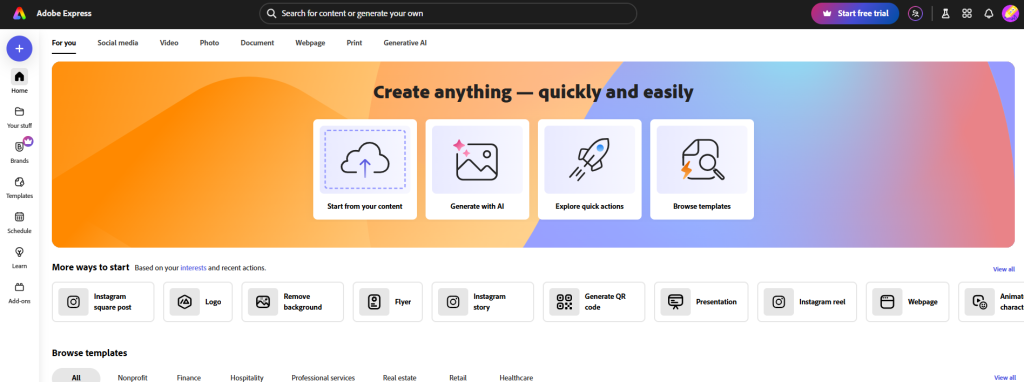
Adobe Express covers image design, short video and social scheduling. Its Content Scheduler lets you plan and publish posts to connected accounts, including Instagram, Facebook, LinkedIn, Pinterest, TikTok, X and YouTube, and it can write caption suggestions with generative AI. Clip Maker turns longer videos into short clips for social media.
Adobe is also testing an AI Assistant in Express. It is a beta on desktop for individual Free and Premium plans and is being rolled out gradually. You describe what you want to create or change, and you can switch back to manual editing at any point.
Adobe Express Plans
- Free: core design and video tools and templates.
- Premium: premium templates and assets, brand kits and more generative AI features.
Edits by Instagram: Free Video Editing on Your Phone
Edits is Instagram's own video editing app. It launched in April 2025 and is free on iOS and Android. It includes frame-accurate trimming, automatic captions, green screen, audio clean-up and 4K export with no watermark, and you can share straight to Instagram or export videos for other platforms.
For businesses, the most useful part may be the insights dashboard, which shows how your Reels are performing and where viewers stop watching. On 30 September 2026, Meta started rolling out an AI assistant in Edits to users in the US. It suggests ideas, hooks and captions based on your account's performance. A desktop version of Edits has been announced but was not available at the time of writing.
CapCut: Quick Edits for Short-Form Video
CapCut remains a popular choice for short-form video, with templates, automatic captions and background removal on mobile, desktop and web. If you use it for business, check the licence for any music, effects or templates you add. CapCut's terms limit some materials to personal, non-commercial use, and businesses should choose music from its Commercial Sounds library.
Scheduling and Publishing
A scheduling tool lets you plan a week or a month of content in one sitting and publish to several networks from one place, which makes it far easier to post consistently.
Buffer
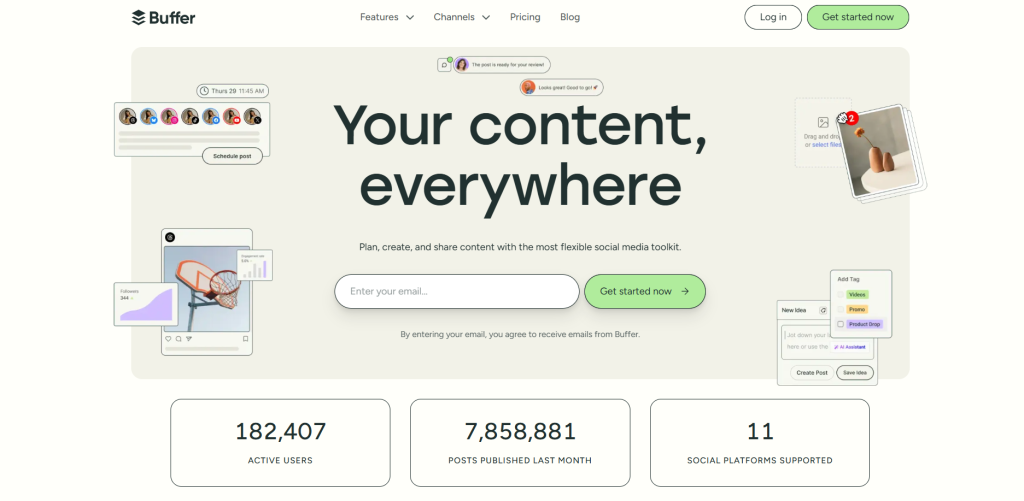
Buffer supports Instagram, Facebook, LinkedIn, TikTok, YouTube Shorts, Pinterest, Threads, Bluesky, Mastodon, X and Google Business Profiles. Its free plan lets you connect up to three channels, with 10 scheduled posts per channel at any one time, and includes Buffer's AI Assistant and a community inbox for replying to comments. Paid plans are priced per channel and add unlimited scheduling and advanced analytics, with approval workflows on the Team plan.
Hootsuite
Hootsuite suits businesses that manage more accounts or need stronger reporting. Its Standard plan lets you manage up to 10 social accounts from one calendar, and you can try it free for 14 days. Higher plans add more team and analytics features.
Meta Business Suite
If you mainly post to Facebook and Instagram, Meta Business Suite is free and lets you plan and schedule posts and stories for both from one planner. You can also add your Threads account to your business portfolio and cross-post to it from Business Suite. Our guide to setting up Meta Business Suite walks you through it.
Listening and Insights
The analytics built into each platform, such as the insights in Meta Business Suite and the Reels dashboard in Edits, cover the basics for most small businesses. To monitor what people say about your brand across the web, social listening tools such as Brandwatch track mentions, sentiment and emerging topics. Brandwatch prices its plans to your requirements, so you will need to ask for a quote.
Selling Through Social Media
Shopify connects your online shop to channels such as Facebook, Instagram and TikTok, so you can tag products in posts and ads. TikTok Shop lets UK businesses sell directly through videos, LIVE streams and creator partnerships. It has no fees to get started and charges fees on the sales you make. Our guide to the best e-commerce platforms compares Shopify with the alternatives.
Meta is also making creator partnerships easier to buy. At Cannes Lions 2026 it announced that Creator Marketplace and Partnership Ads Hub will be combined into a single Meta Creator Marketing Hub later this year, and that Facebook creators are being added to Creator Marketplace alongside Instagram creators.
Planning as a Team
Trello gives you a visual board for content calendars, campaign ideas and approvals. Its free plan covers up to 10 collaborators per workspace, which is enough for most small teams.
A Note on Hashtags
Hashtag tools matter less than they used to. Instagram now limits posts and Reels to five hashtags, and its head, Adam Mosseri, has said that hashtags help with search but do not increase reach. A few specific, relevant tags work better than a long list of generic ones.
Choosing Your Toolkit
Most small businesses can cover the essentials with a design tool such as Canva or Adobe Express, a video editor such as Edits or CapCut, and a scheduler such as Buffer or Meta Business Suite. Start on the free plans and upgrade when you hit their limits.
AI features can speed up first drafts, but your content still needs your own voice, your expertise and real photos of your business and team. Our article on why authentic content is winning on social media in 2026 explains why that matters.
If you would rather hand over the day-to-day work, our social media management team can plan, create and schedule your content for you.